Offline Conversion Tracking: Setup and Best Practices
Learn how to set up offline conversion tracking to connect ad clicks with actual sales, boosting your marketing accuracy and ROI.

Offline Conversion Tracking: Setup and Best Practices
Offline conversion tracking connects an ad click to what happens after the browser closes: a phone sale, a signed contract, an in-store purchase, a CRM deal marked closed-won. The next action is simple. Capture the click identifier (GCLID, GBRAID, or WBRAID) the moment a lead converts online, store it against that lead in your CRM, and either upload it back to your ad platform or turn on Enhanced Conversions for Leads. This guide walks through both paths, plus the data formatting rules and diagnostics that keep the pipeline accurate.
- Capture the click ID at form submission, not later
- Store it as a persistent field on the CRM lead record
- Match it to a conversion event when the deal closes
- Push it back through Data Manager API, batch upload, or Enhanced Conversions
Pro Tip: Set up the CRM field for click IDs before you build anything else. Every other step depends on that field existing and being populated correctly from day one.
Key Takeaways
Offline conversion tracking works when a click ID is captured at conversion, stored in the CRM, and synced back to ad platforms through an automated, hashed, and deduplicated pipeline.
| Point | Details |
|---|---|
| Capture the click ID first | GCLID, GBRAID, or WBRAID must be stored on the CRM lead record before anything else works. |
| Hash all PII with SHA-256 | Never send raw email, phone, or name data to any ad platform. |
| Migrate to Data Manager API | Legacy Google Ads API uploads for offline conversions stop working June 15, 2026. |
| Combine methods for better matches | Running Enhanced Conversions alongside GCLID uploads typically lifts match rates 5 to 15 points. |
| Validate matches with Getpaidlens | Getpaidlens checks offline conversion data quality and ranks which measurement gaps to fix first. |
Table of Contents
- What Offline Conversions Are and Why They Matter
- How Matching and Attribution Actually Work
- Choosing an Implementation Method
- Setup Checklist for This Week
- Data Formatting Rules You Can’t Skip
- Fixing Common Diagnostic Errors
- Privacy and Security Best Practices
- How Offline Signals Change Bidding and Reporting
- Why a Server-Side Pipeline Wins Long-Term
- What Actually Trips Up Teams Doing This for the First Time
- Turn Offline Signals Into Faster Ad Decisions
- Essential Docs for Implementation
- Sources
- FAQ
What Offline Conversions Are and Why They Matter
An offline conversion is any valuable action that happens outside your website after someone clicks an ad. Closed-won deals in B2B pipelines, phone orders taken by a sales team, in-store purchases tied to a digital coupon, and CRM stage changes like “qualified lead” or “contract signed” all count. None of these get logged automatically by a pixel, because there’s no browser event to catch.
That gap matters because most valuable revenue in B2B and high-consideration sales doesn’t happen on a landing page. Without offline data, Google Ads and Meta optimize toward form fills and add-to-carts, not the leads that actually turn into paying customers.
Feeding real outcomes back into the ad platform changes bidding behavior and reporting accuracy:
- Smart Bidding starts optimizing for revenue quality, not lead volume
- Attribution reflects actual close rates instead of surface-level clicks
- Long sales cycles finally show up in the numbers that matter
Typical use cases include B2B teams closing deals weeks after the initial click, consultative sales with multiple touchpoints, and retailers taking phone or webhook-driven orders that never touch a checkout page.
How Matching and Attribution Actually Work
Offline conversion tracking depends on one of two mechanisms: a deterministic click identifier, or hashed personal data used as a supplemental match key.
- GCLID matches conversions from standard Google Search and Display clicks.
- GBRAID applies to app conversions and privacy-safe measurement on iOS traffic.
- WBRAID applies to web conversions from ad clicks on iOS in privacy-conscious environments.
The Google Ads API requires exactly one of these three identifiers per uploaded conversion. Sending more than one, or none, breaks the match.
Enhanced Conversions for Leads adds a second layer. Instead of relying only on a click ID, you hash first-party identifiers, typically email and phone, using SHA-256, and send those as supplemental match keys. Google recommends this as the more durable option because hashed identifiers survive longer than click IDs and support cross-device and engaged-view conversions that GCLID-only uploads miss.
Deduplication runs on the combination of a unique identifier, the conversion action name, and a precise date and time stamp. Duplicate combinations get silently rejected, which is exactly what you want when a lead syncs twice.
Combining GCLID uploads with hashed PII commonly lifts match rates by 5 to 15 percentage points, especially on mobile and iOS traffic where click IDs degrade faster.
Reporting attaches to the original click date, not the upload date, so a deal closed 60 days after the click still shows up against that original ad interaction.
Choosing an Implementation Method
Four patterns cover almost every team’s needs, and the right one depends on volume, engineering resources, and how fast you need conversions flowing back.
- Manual CSV uploads: fine for testing a new conversion action or validating that a handful of leads match correctly.
- Google Ads API uploads: scriptable, good for mid-volume teams with some engineering support.
- Data Manager API: the platform’s forward path, required for both offline conversion imports and Enhanced Conversions for Leads starting June 15, 2026.
- Server-side/webhook pipelines: a single endpoint that receives a CRM event and forwards it to Google, Meta, and Microsoft simultaneously.
| Method | Best fit | Setup effort |
|---|---|---|
| Manual CSV | One-off tests, low volume | Low |
| Google Ads API | Mid-volume, existing dev resources | Medium |
| Data Manager API | Scaled automation, 2026 forward compatibility | Medium to high |
| Server-side/webhook | Multi-platform delivery, consent-aware architecture | High |
Server-side pipelines earn their engineering cost by giving you one place to handle consent, deduplication, and hashing before an event ever reaches an ad platform. That single endpoint also means one debugging surface instead of three separate integrations breaking independently.

Google will retire legacy Google Ads API uploads for offline conversions in favor of the Data Manager API on June 15, 2026, and developer token allowlisting will depend on recent API activity. Teams still running manual uploads should treat this as the deadline to modernize, not a future problem.
Pro Tip: If you’re choosing between building your own server-side pipeline and enabling Enhanced Conversions for Leads, do both. They aren’t competing approaches. Enhanced Conversions strengthens matches on top of whatever click ID pipeline you already run.
Setup Checklist for This Week
- Create the conversion action in your ad account using an import-compatible type (UPLOAD_CLICKS or equivalent), and set it as primary or secondary based on how you want Smart Bidding to weight it.
- Capture GCLID, GBRAID, or WBRAID on landing pages and persist the value in a first-party cookie and a hidden form field so it survives the session.
- Add custom fields to your CRM lead object for the click ID and for hashed contact identifiers (email, phone).
- Pick an upload method (Data Manager API, Google Ads API, batch CSV, or a native CRM connector) and run a test batch against a handful of real leads.
- Check the results in the enhanced conversions diagnostics report and the offline import job summary before scaling to full volume.
This sequence matters because teams that skip persisting the click ID at capture time almost always hit a wall later. Fixing that retroactively means rebuilding CRM fields and losing weeks of attributable data.
Pro Tip: Test with five real leads before automating anything. A working sample of five tells you more about your hashing and formatting than a spreadsheet of theoretical field mappings.
Data Formatting Rules You Can’t Skip
Every offline conversion upload needs a consistent set of fields, and small formatting mistakes are the most common reason uploads silently fail to match.
| Field | Requirement |
|---|---|
| conversion_action_id | Must match an existing conversion action in the account |
| conversion_date_time | Specific timestamp format, including time zone offset |
| conversion_value + currency | Required for value-based bidding to work correctly |
| order_id | Optional but strongly recommended for deduplication |
| Click identifier | Exactly one of GCLID, GBRAID, or WBRAID, never more than one |
Personally identifiable data, email, phone, name, and address, has to be normalized (lowercased, trimmed) and hashed with SHA-256 before it ever leaves your servers, per Google’s Enhanced Conversions setup guidance. Never send raw PII in an upload.
Deduplication runs on the combination of unique identifier, conversion action name, date, and time, so including a stable order_id prevents accidental double-counting when a CRM syncs the same event twice.
Fixing Common Diagnostic Errors
Most offline conversion failures fall into three buckets, and all three show up in the platform’s own diagnostics before you need to guess.
- CLICK_NOT_FOUND: the GCLID, GBRAID, or WBRAID sent doesn’t match any recorded click, usually because it was captured incorrectly or expired.
- Bad hash formatting: PII wasn’t normalized (lowercase, trimmed whitespace) before hashing, so Google can’t match it against its own hashed records.
- Missing click IDs: the field simply wasn’t populated on the lead record, often because the landing page script never fired.
Check the enhanced conversions diagnostics report and the offline import job summary first. Imported conversions typically appear within a few hours of a successful upload, attributed back to the original click date.
Pro Tip: Group related uploads under the same job_id. It makes the offline import job summary far easier to scan when something breaks at scale.
Privacy and Security Best Practices
Hash every piece of personal data with SHA-256 before it leaves your infrastructure. Ad platforms should only ever receive hashed identifiers, never raw email addresses or phone numbers.
- Record and honor consent signals (Consent Mode v2 or an equivalent framework) before any conversion event fires
- Document the full data flow from CRM to ad platform in your privacy policy, covering GDPR and CCPA obligations
- Minimize stored PII in uploads; hashed email or phone plus an order_id is usually sufficient for matching
- Limit and rotate API tokens, and confirm Data Manager API access is properly allowlisted
Getpaidlens’s own security and data protection practices reflect this same principle: hash early, store less, and control access tightly at every integration point.
How Offline Signals Change Bidding and Reporting
A B2B team that starts uploading closed-won deals typically sees Smart Bidding shift budget toward the campaigns generating real revenue, not just form fills. A retailer syncing phone orders back to Google Ads often sees reported ROAS climb, not because sales increased, but because previously invisible revenue finally counts.
- Setting the offline conversion as primary tells Smart Bidding to optimize directly for it
- Setting it as secondary keeps it visible in reporting without changing bid strategy
- Combining click IDs with Enhanced Conversions raises match rates, typically by 5 to 15 percentage points
Offline uploads don’t help much on extremely low-volume campaigns, where there isn’t enough conversion data for Smart Bidding to learn from, or on conversions that fall outside the 90-day import window after the last click. Google discards anything uploaded past that point.
Why a Server-Side Pipeline Wins Long-Term
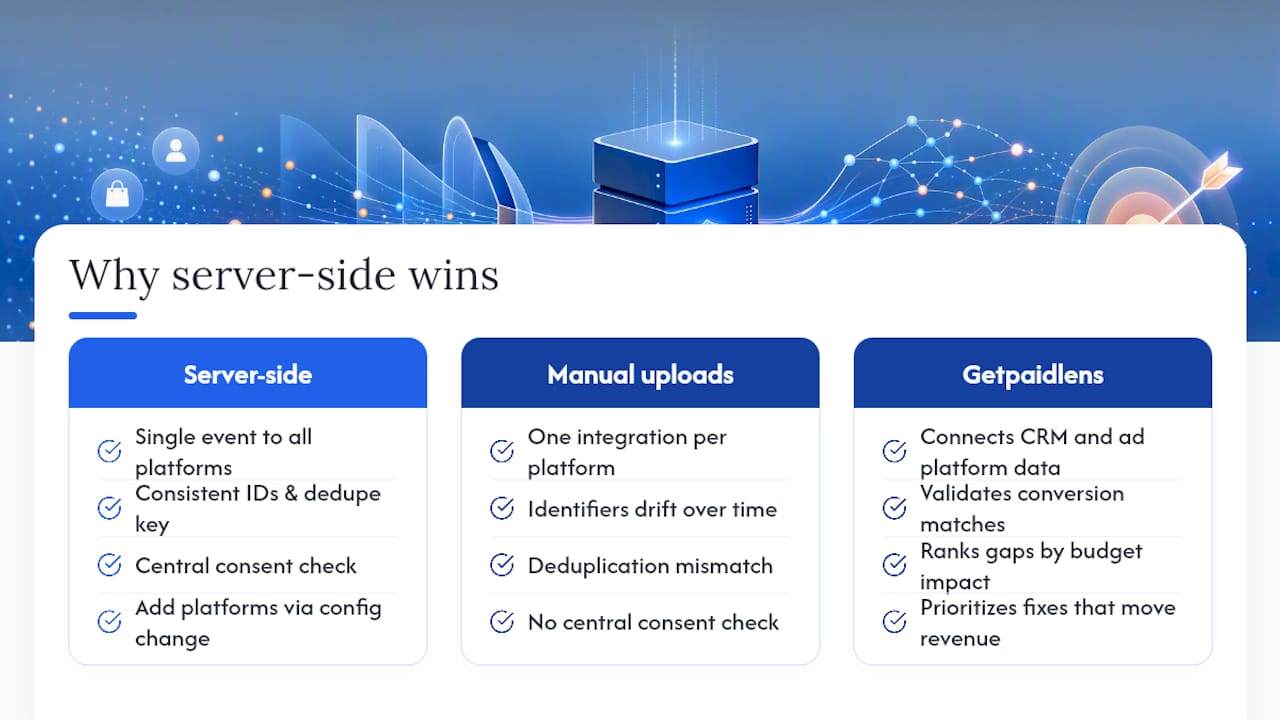
A server-side or webhook-based architecture solves a problem that manual uploads never will: consistency across platforms. One event, captured once, fires simultaneously to Google, Meta, and Microsoft with the same click ID, the same hashed identifiers, and the same deduplication key. That single point of control is also where consent gets checked before anything is sent.
Pro Tip: Route every offline event through one internal endpoint, even if you only send to one ad platform today. Adding a second platform later becomes a config change instead of a rebuild.
A CRM pipeline that captures GCLID, GBRAID, or WBRAID alongside hashed contact identifiers lets a single event reach multiple ad platforms with consistent deduplication, instead of three separate integrations drifting out of sync over time.
Getpaidlens approaches this from the measurement side rather than the pipeline side. It connects CRM and ad platform data, validates whether conversions are actually matching correctly, and ranks which measurement gaps are costing the most budget, so teams spend engineering time fixing the pipeline issues that actually move revenue.
What Actually Trips Up Teams Doing This for the First Time
The single biggest priority is capturing and persisting the click ID at the moment of conversion. Everything else is secondary. The most common mistake I see is treating offline uploads as a one-time project instead of an automated pipeline, then wondering why match rates decay within a month. Build it once, monitor the diagnostics weekly, and don’t skip that step.
Turn Offline Signals Into Faster Ad Decisions
Getting the pipeline built is only half the job. The harder part is knowing whether your offline conversions are actually matching well, and which campaigns deserve budget because of it. Getpaidlens connects your CRM and ad platform data, checks match quality against the standards covered above, and surfaces a ranked list of what to fix or scale first, instead of leaving your team to dig through diagnostics reports manually every week.
If you’re already running offline conversion imports or Enhanced Conversions for Leads, Getpaidlens plugs into that data through its marketing data integrations and validates it against your actual ad platform results. Teams using it get a prioritized view of measurement issues instead of a spreadsheet of raw numbers, backed by the same attribution logic that determines which campaigns deserve more budget. Connect your ad accounts and CRM to see where your current match rates stand.
Essential Docs for Implementation
- Offline conversion import overview
- Upload offline conversion API reference
- Enhanced Conversions for Leads setup guide
- Import guidelines and the 90-day window
Sources
- About offline conversion imports - Google Ads Help
- Enhanced conversions for leads setup - Google Ads developer docs
- Guidelines for importing offline conversions - Google Ads Help
- Google Ads offline conversions (Bloomreach documentation)
FAQ
Can I run Google Ads without conversion tracking?
Yes, campaigns will still serve and spend, but Smart Bidding has no signal to optimize toward, so performance typically stalls at whatever manual bid strategy you set.
How do I set up offline conversion tracking in Google Ads?
Create a compatible conversion action, capture and persist the click ID at lead capture, store it in your CRM, and upload matched conversions through Data Manager API, batch CSV, or Enhanced Conversions for Leads.
How do you track conversions that happen outside a website?
You match the offline event, a closed deal, phone sale, or in-store purchase, back to the original ad click using GCLID, GBRAID, WBRAID, or hashed contact identifiers through Enhanced Conversions.
When should I use offline conversions instead of Enhanced Conversions for Leads?
Use offline conversion uploads when you already capture reliable click IDs; use Enhanced Conversions for Leads when you want a more durable, hashed-identifier match that survives longer sales cycles and works across devices. Running both together, as Getpaidlens’s own integration data confirms, produces the strongest match rates.